Free HTML Live Editor: Write, Preview & Test HTML Code Online Instantly فری HTML لائیو ایڈیٹر: HTML کوڈ لکھیں، فوراً پری ویو دیکھیں اور آن لائن ٹیسٹ کریں
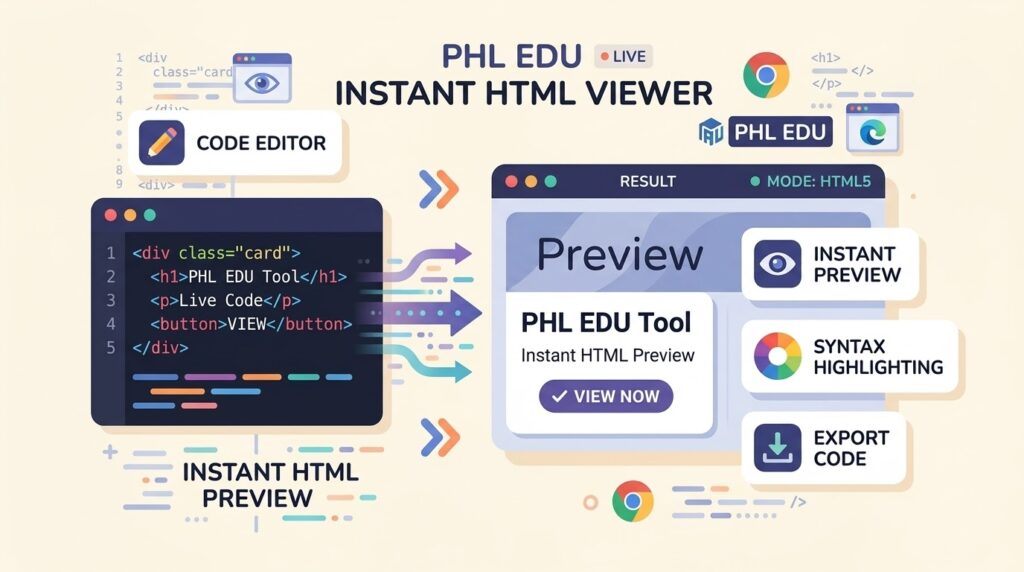
A good HTML live editor shows you what your code does the moment you type it. PHL EDU’s free online HTML editor gives you a code pane on one side and a live preview on the other, so you can write, test and fix HTML without saving files or refreshing a browser. It also works as a quick HTML viewer, a Tailwind CSS playground and a snippet library with 117 ready-made layout blocks. There is no signup. Open it, paste your code and watch the page build in real time. ایک اچھا HTML لائیو ایڈیٹر آپ کو کوڈ لکھتے ہی اس کا نتیجہ دکھا دیتا ہے۔ PHL EDU کا فری آن لائن HTML ایڈیٹر ایک طرف کوڈ پین اور دوسری طرف لائیو پری ویو دیتا ہے، یعنی آپ فائل سیو کیے یا براؤزر ریفریش کیے بغیر HTML لکھ، ٹیسٹ اور ٹھیک کر سکتے ہیں۔ یہ ایک تیز HTML ویور، Tailwind CSS پلے گراؤنڈ اور 117 تیار لے آؤٹ سنیپٹس کی لائبریری بھی ہے۔ کوئی سائن اپ نہیں۔ ٹول کھولیں، کوڈ پیسٹ کریں اور صفحہ اپنی آنکھوں کے سامنے بنتا دیکھیں۔
Open the HTML Live EditorHTML لائیو ایڈیٹر کھولیں
<h1>Build faster.</h1>
<button>Get started</button>
</section>
What Is an HTML Live Editor? HTML لائیو ایڈیٹر کیا ہے؟
An HTML live editor is a browser-based tool where the code you type is rendered immediately in a preview area. Traditional editing means writing a file, saving it, switching to the browser and refreshing. A live editor removes those steps. Every change appears on screen within a fraction of a second, which makes it the fastest way to learn HTML, test a layout idea or debug a broken section. HTML لائیو ایڈیٹر ایک براؤزر بیسڈ ٹول ہے جس میں آپ جو کوڈ لکھتے ہیں وہ فوراً پری ویو ایریا میں رینڈر ہو جاتا ہے۔ روایتی طریقے میں فائل لکھنا، سیو کرنا، براؤزر میں جانا اور ریفریش کرنا پڑتا ہے۔ لائیو ایڈیٹر یہ سب مراحل ختم کر دیتا ہے۔ ہر تبدیلی سیکنڈ کے ایک حصے میں اسکرین پر نظر آتی ہے، اس لیے HTML سیکھنے، لے آؤٹ آئیڈیا ٹیسٹ کرنے اور خراب حصہ ڈھونڈنے کا یہ تیز ترین طریقہ ہے۔
HTML editor, HTML viewer and HTML previewer: what is the difference? HTML ایڈیٹر، HTML ویور اور HTML پری ویوئر میں فرق
- HTML editor: lets you write and change code.
- HTML viewer / HTML preview tool: shows how that code looks when rendered.
- HTML live editor: does both at once, side by side, and updates as you type.
- HTML ایڈیٹر: کوڈ لکھنے اور بدلنے کی سہولت دیتا ہے۔
- HTML ویور / پری ویو ٹول: دکھاتا ہے کہ کوڈ رینڈر ہو کر کیسا نظر آتا ہے۔
- HTML لائیو ایڈیٹر: دونوں کام ساتھ ساتھ کرتا ہے اور ٹائپ کرتے ہی اپڈیٹ ہو جاتا ہے۔
Why Use This Free Online HTML Editor? اس فری آن لائن HTML ایڈیٹر کا انتخاب کیوں؟
- Nothing to install. It runs in your browser on a laptop, tablet or phone.
- No signup. Open the page and start typing.
- Styling works out of the box. Tailwind CSS and Font Awesome icons are loaded into the preview for you, so snippet classes and icons render correctly.
- Start from a block, not a blank page. 117 snippets across 25 categories insert with one click.
- Take your work with you. Copy the code or download it as a standalone .html file.
- کچھ انسٹال نہیں کرنا۔ یہ لیپ ٹاپ، ٹیبلیٹ اور موبائل کے براؤزر میں چلتا ہے۔
- سائن اپ نہیں۔ صفحہ کھولیں اور ٹائپ کرنا شروع کریں۔
- اسٹائلنگ پہلے سے تیار۔ پری ویو میں Tailwind CSS اور Font Awesome آئیکنز خود لوڈ ہوتے ہیں، اس لیے سنیپٹ کی کلاسز اور آئیکنز درست نظر آتے ہیں۔
- خالی صفحے کے بجائے تیار بلاک سے آغاز۔ 25 کیٹیگریز میں 117 سنیپٹس ایک کلک پر شامل ہو جاتے ہیں۔
- کام اپنے ساتھ لے جائیں۔ کوڈ کاپی کریں یا الگ .html فائل کی صورت میں ڈاؤن لوڈ کریں۔
Key Features of the PHL EDU HTML Live Editor PHL EDU HTML لائیو ایڈیٹر کے اہم فیچرز
1. Split-screen editor and live preview1. اسپلٹ اسکرین ایڈیٹر اور لائیو پری ویو
The workspace has an editor pane (editor.html) and a Live Preview pane. On desktop they sit side by side; on a phone they stack vertically so each still gets usable space. The preview refreshes about 300 milliseconds after you stop typing, which keeps typing smooth while still feeling instant. ورک اسپیس میں ایک ایڈیٹر پین (editor.html) اور ایک Live Preview پین ہے۔ ڈیسک ٹاپ پر یہ دونوں ساتھ ساتھ ہوتے ہیں اور موبائل پر اوپر نیچے آ جاتے ہیں تاکہ دونوں کو مناسب جگہ ملے۔ ٹائپ رکنے کے تقریباً 300 ملی سیکنڈ بعد پری ویو اپڈیٹ ہو جاتا ہے، اس لیے ٹائپنگ ہموار رہتی ہے اور نتیجہ پھر بھی فوری لگتا ہے۔
2. Snippet library with search2. سرچ کے ساتھ سنیپٹ لائبریری
Open the sidebar from the menu button and pick any block: hero sections, navbars, pricing cards, forms, tables, modals, alerts, tabs, timelines and more. Clicking a snippet appends it to your code and updates the preview. A search box filters snippets by name or category. مینو بٹن سے سائیڈ بار کھولیں اور کوئی بھی بلاک چنیں: ہیرو سیکشن، نیو بار، پرائسنگ کارڈز، فارمز، ٹیبلز، موڈلز، الرٹس، ٹیبز، ٹائم لائنز اور بہت کچھ۔ سنیپٹ پر کلک کرنے سے وہ آپ کے کوڈ میں شامل ہو جاتا ہے اور پری ویو اپڈیٹ ہوتا ہے۔ سرچ باکس نام یا کیٹیگری سے سنیپٹس فلٹر کرتا ہے۔
3. Works with both snippets and full HTML documents3. سنیپٹس اور مکمل HTML ڈاکیومنٹ دونوں کے ساتھ کام
You can paste a small fragment or a complete page that starts with <!DOCTYPE html>. For fragments, the tool wraps them in a proper page. For full documents, it adds Tailwind CSS or Font Awesome only if your code does not already include them, so nothing is loaded twice. آپ چھوٹا ٹکڑا بھی پیسٹ کر سکتے ہیں اور <!DOCTYPE html> سے شروع ہونے والا مکمل صفحہ بھی۔ ٹکڑوں کو ٹول خود درست صفحے میں لپیٹ دیتا ہے۔ مکمل ڈاکیومنٹ میں Tailwind CSS یا Font Awesome صرف تب شامل کرتا ہے جب آپ کے کوڈ میں پہلے سے موجود نہ ہوں، اس لیے کوئی چیز دو بار لوڈ نہیں ہوتی۔
4. One-click Format, Copy, Download and Clear4. ایک کلک پر Format، Copy، Download اور Clear
- Format: a built-in HTML formatter that re-indents messy markup so it is easier to read.
- Copy: copies the whole code to your clipboard.
- Download: saves your page as a ready-to-open .html file.
- Clear: empties the editor and preview for a fresh start.
- Format: بلٹ اِن HTML فارمیٹر بکھرے ہوئے کوڈ کو ترتیب سے انڈینٹ کر دیتا ہے تاکہ پڑھنا آسان ہو۔
- Copy: پورا کوڈ کلپ بورڈ پر کاپی کر دیتا ہے۔
- Download: آپ کا صفحہ فوراً کھلنے والی .html فائل کی صورت میں سیو کرتا ہے۔
- Clear: ایڈیٹر اور پری ویو خالی کر کے نئی شروعات دیتا ہے۔
5. Refresh View and Full Screen preview5. Refresh View اور فُل اسکرین پری ویو
Use Refresh View to re-render the page, for example after an animation or a script. Use Full Screen to inspect your design at the full size of your display. Refresh View سے صفحہ دوبارہ رینڈر کریں، مثلاً اینیمیشن یا اسکرپٹ کے بعد۔ Full Screen سے اپنا ڈیزائن پوری اسکرین کے سائز میں جانچیں۔
6. Responsive design for desktop and mobile6. ڈیسک ٹاپ اور موبائل دونوں کے لیے ریسپانسو ڈیزائن
The snippet sidebar stays open on desktop and slides out on small screens, so the editor remains usable on a phone. The dark, grid-patterned interface with a pulsing LIVE indicator is easy on the eyes during long sessions. سنیپٹ سائیڈ بار ڈیسک ٹاپ پر کھلا رہتا ہے اور چھوٹی اسکرین پر سلائیڈ ہو کر آتا ہے، اس لیے موبائل پر بھی ایڈیٹر قابلِ استعمال رہتا ہے۔ گرڈ پیٹرن والا ڈارک انٹرفیس اور دھڑکتا ہوا LIVE اشارہ لمبے سیشن میں آنکھوں پر بھاری نہیں پڑتا۔
The Snippet Library: 117 Ready-Made HTML and Tailwind Blocks سنیپٹ لائبریری: 117 تیار HTML اور Tailwind بلاکس
The library is grouped into 25 categories. Each block is built with Tailwind CSS utility classes, so you can change colours, spacing and text directly in the editor. لائبریری 25 کیٹیگریز میں تقسیم ہے۔ ہر بلاک Tailwind CSS یوٹیلیٹی کلاسز سے بنا ہے، اس لیے آپ رنگ، اسپیسنگ اور متن ایڈیٹر ہی میں بدل سکتے ہیں۔
| Group | Categories included |
|---|---|
| Page structure | Boilerplate (including an SEO meta version), Hero, Navbar, Footer, Grid, Navigation |
| Content blocks | Cards, Tables, Stats, Pricing, Timeline, Empty States |
| Interaction | Forms, Buttons, Modal, Dropdowns, Tabs (accordion / FAQ), Tooltips, Chat, File Upload |
| Feedback and status | Alerts, Badges, Progress, Avatars |
| Legal pages | Privacy Policy, Terms & Conditions, Cookie Policy, Disclaimer, Refund Policy templates |
اہم گروپس: پیج اسٹرکچر (Boilerplate، Hero، Navbar، Footer، Grid)، کنٹینٹ بلاکس (Cards، Tables، Stats، Pricing، Timeline)، انٹرایکشن (Forms، Buttons، Modal، Dropdowns، Tabs، Tooltips، Chat، File Upload)، فیڈ بیک (Alerts، Badges، Progress، Avatars) اور لیگل پیجز (Privacy Policy، Terms، Cookie Policy، Disclaimer، Refund Policy ٹیمپلیٹس)۔
How to Use the HTML Live Editor: Step-by-Step HTML لائیو ایڈیٹر استعمال کرنے کا مرحلہ وار طریقہ
- Open the tool. Go to phledu.com/web-master/live-editor. A hero section is loaded as a starting example. ٹول کھولیں۔ phledu.com/web-master/live-editor پر جائیں۔ ابتدائی مثال کے طور پر ایک ہیرو سیکشن لوڈ ہوتا ہے۔
- Add code. Type in the editor, paste your own HTML, or open the menu and click a snippet to insert it. Use the search box to find one quickly. کوڈ شامل کریں۔ ایڈیٹر میں ٹائپ کریں، اپنا HTML پیسٹ کریں، یا مینو کھول کر کسی سنیپٹ پر کلک کریں۔ جلدی تلاش کے لیے سرچ باکس استعمال کریں۔
- Watch the preview. The Live Preview updates a moment after you stop typing. Click Refresh View if you want to force a re-render. پری ویو دیکھیں۔ ٹائپ رکنے کے ذرا بعد Live Preview اپڈیٹ ہو جاتا ہے۔ دوبارہ رینڈر کرنا ہو تو Refresh View دبائیں۔
- Edit the details. Change text, Tailwind classes, colours and spacing directly in the code and see each result immediately. تفصیلات بدلیں۔ متن، Tailwind کلاسز، رنگ اور اسپیسنگ کوڈ میں براہِ راست بدلیں اور ہر نتیجہ فوراً دیکھیں۔
- Clean up with Format. Click Format to re-indent the markup before you share or save it. Format سے صاف کریں۔ شیئر یا سیو کرنے سے پہلے Format دبا کر کوڈ کو ترتیب میں لائیں۔
- Check it full size. Press Full Screen to review the layout at the size of your display. پورے سائز میں جانچیں۔ Full Screen دبا کر لے آؤٹ کو اپنی اسکرین کے مکمل سائز میں دیکھیں۔
- Copy or download. Use Copy to paste the code into WordPress, a theme file or your project, or Download to get a standalone .html file. کاپی یا ڈاؤن لوڈ کریں۔ کوڈ کو WordPress، تھیم فائل یا اپنے پروجیکٹ میں ڈالنے کے لیے Copy، اور الگ .html فائل کے لیے Download استعمال کریں۔
- Start over any time. The Clear button (trash icon) empties the editor and preview. جب چاہیں نئی شروعات کریں۔ Clear بٹن (ڈسٹ بن آئیکن) ایڈیٹر اور پری ویو خالی کر دیتا ہے۔
Benefits of an Online HTML Editor for Web Developers ویب ڈویلپرز کے لیے آن لائن HTML ایڈیٹر کے فائدے
For beginners and studentsابتدائی اور طلبہ کے لیے
Seeing the result of every tag teaches faster than reading about it. Change a heading, add a button, break a layout on purpose, and watch what happens. The ready-made blocks also show how professional pages are structured. ہر ٹیگ کا نتیجہ دیکھنا اس کے بارے میں پڑھنے سے زیادہ تیزی سے سکھاتا ہے۔ ہیڈنگ بدلیں، بٹن شامل کریں، جان بوجھ کر لے آؤٹ توڑیں اور دیکھیں کیا ہوتا ہے۔ تیار بلاکس یہ بھی دکھاتے ہیں کہ پروفیشنل صفحات کا ڈھانچا کیسا ہوتا ہے۔
For freelancers and agenciesفری لانسرز اور ایجنسیوں کے لیے
Prototype a section for a client in minutes, adjust it live, then copy the final code. It is a fast way to test a hero, a pricing table or a contact form before building it into the real site. کلائنٹ کے لیے کوئی سیکشن منٹوں میں پروٹوٹائپ کریں، لائیو ایڈجسٹ کریں اور آخر میں حتمی کوڈ کاپی کر لیں۔ اصل سائٹ میں لگانے سے پہلے ہیرو، پرائسنگ ٹیبل یا کانٹیکٹ فارم ٹیسٹ کرنے کا یہ تیز راستہ ہے۔
For WordPress users and bloggersWordPress یوزرز اور بلاگرز کے لیے
Build a custom block, table or call-to-action box, check how it looks, then paste it into a Custom HTML block. Testing first avoids breaking a live page. کسٹم بلاک، ٹیبل یا کال ٹو ایکشن باکس بنائیں، اس کی شکل جانچیں اور پھر Custom HTML بلاک میں پیسٹ کریں۔ پہلے ٹیسٹ کرنے سے لائیو صفحہ خراب ہونے سے بچ جاتا ہے۔
For teachers and trainersاساتذہ اور ٹرینرز کے لیے
Run a live coding demo in class without asking students to install anything. They only need a browser. کلاس میں لائیو کوڈنگ ڈیمو کریں اور طلبہ سے کچھ انسٹال نہ کروائیں۔ انہیں صرف براؤزر چاہیے۔
Practical Use Cases عملی استعمال
- Learn HTML and Tailwind CSS by editing real examples.
- Prototype landing pages, pricing sections and sign-up forms.
- Test and debug a snippet before adding it to a website.
- Preview HTML you received or copied from another source.
- Draft privacy, terms and refund page layouts from the legal templates.
- Format messy HTML so it is readable again.
- حقیقی مثالوں میں تبدیلی کر کے HTML اور Tailwind CSS سیکھیں۔
- لینڈنگ پیجز، پرائسنگ سیکشنز اور سائن اپ فارمز کے پروٹوٹائپ بنائیں۔
- ویب سائٹ میں لگانے سے پہلے سنیپٹ ٹیسٹ اور ڈیبگ کریں۔
- کسی دوسرے ذریعے سے ملا یا کاپی کیا ہوا HTML پری ویو کریں۔
- لیگل ٹیمپلیٹس سے پرائیویسی، ٹرمز اور ریفنڈ پیج کے لے آؤٹ کا مسودہ بنائیں۔
- بکھرے ہوئے HTML کو دوبارہ قابلِ مطالعہ بنائیں۔
Live editor vs. a local setupلائیو ایڈیٹر بمقابلہ لوکل سیٹ اپ
| Task | Traditional workflow | HTML live editor |
|---|---|---|
| Setup | Install an editor, create files | Open a web page |
| See a change | Save, switch window, refresh | Appears as you type |
| Start a layout | Write or hunt for boilerplate | Click a snippet |
| Use on mobile | Hard | Responsive layout |
| Large multi-file projects | Best choice | Not the intended use |
The API Configuration Panel API Configuration پینل
Besides Snippets, the sidebar has an API Configuration tab with toggles and key fields for seven providers: Google Gemini Pro, OpenAI GPT-4o, DeepSeek R1, Llama 3, Groq, a Web Scraper API and an Image Gen API. The panel says keys are stored locally in your browser only. Treat any API key like a password: use keys with limited permissions and never paste one on a shared computer you do not control. Snippets کے ساتھ سائیڈ بار میں API Configuration ٹیب بھی ہے جس میں سات پرووائیڈرز کے لیے ٹوگل اور کی فیلڈز ہیں: Google Gemini Pro، OpenAI GPT-4o، DeepSeek R1، Llama 3، Groq، Web Scraper API اور Image Gen API۔ پینل کے مطابق کیز صرف آپ کے براؤزر میں لوکل اسٹور ہوتی ہیں۔ ہر API کی کو پاس ورڈ کی طرح سمجھیں: محدود اجازتوں والی کیز استعمال کریں اور کسی مشترکہ کمپیوٹر پر کبھی پیسٹ نہ کریں۔
New to API keys? Read our guide on how to get a free AI API key. API کیز میں نئے ہیں؟ ہماری گائیڈ مفت AI API کی کیسے حاصل کریں پڑھیں۔
Tips and Honest Limits مفید مشورے اور حدود
- Internet needed for styling. Tailwind CSS and Font Awesome load from a CDN, so the preview needs a connection to style correctly.
- Prototype first. The Tailwind CDN build is meant for quick prototyping. For a high-traffic production site, compile your CSS in your own build process.
- Your code is not saved automatically. Use Copy or Download before closing the tab.
- Mind what you paste. The preview runs the HTML and scripts you give it, so do not paste code you do not trust.
- It previews code; it does not host sites. To publish a page, move the code to your own hosting or CMS.
- اسٹائلنگ کے لیے انٹرنیٹ ضروری ہے۔ Tailwind CSS اور Font Awesome CDN سے لوڈ ہوتے ہیں، اس لیے درست اسٹائل کے لیے کنکشن چاہیے۔
- پہلے پروٹوٹائپ۔ Tailwind CDN تیز پروٹوٹائپنگ کے لیے ہے۔ زیادہ ٹریفک والی پروڈکشن سائٹ کے لیے اپنے بلڈ پروسیس میں CSS کمپائل کریں۔
- کوڈ خودکار سیو نہیں ہوتا۔ ٹیب بند کرنے سے پہلے Copy یا Download کر لیں۔
- پیسٹ کرتے وقت احتیاط۔ پری ویو آپ کا دیا ہوا HTML اور اسکرپٹس چلاتا ہے، اس لیے ناقابلِ اعتماد کوڈ پیسٹ نہ کریں۔
- یہ کوڈ پری ویو کرتا ہے، ویب سائٹ ہوسٹ نہیں کرتا۔ صفحہ شائع کرنے کے لیے کوڈ اپنی ہوسٹنگ یا CMS میں منتقل کریں۔
More Free Tools from PHL EDU PHL EDU کے مزید فری ٹولز
Pair the editor with other free tools: build legal pages, create invoices, work with PDFs, or learn the SEO basics that help your pages rank. See also our guides on free website builders, SEO concepts for beginners and on-page SEO. ایڈیٹر کو دوسرے فری ٹولز کے ساتھ ملا کر استعمال کریں: لیگل پیجز بنائیں، انوائس تیار کریں، PDFs پر کام کریں یا وہ SEO بنیادیں سیکھیں جو آپ کے صفحات کو رینک کرنے میں مدد دیتی ہیں۔ ہماری گائیڈز فری ویب سائٹ بلڈرز، SEO کے بنیادی تصورات اور آن پیج SEO بھی دیکھیں۔
Frequently Asked Questions About the HTML Live Editor HTML لائیو ایڈیٹر کے بارے میں اکثر پوچھے گئے سوالات
What is an HTML live editor?HTML لائیو ایڈیٹر کیا ہے؟
It is an online tool where you write HTML and see the rendered result next to it, updating as you type, without saving files or refreshing the browser.یہ ایک آن لائن ٹول ہے جس میں آپ HTML لکھتے ہیں اور اس کے ساتھ ہی رینڈر شدہ نتیجہ ٹائپ کے ساتھ اپڈیٹ ہوتا نظر آتا ہے، فائل سیو کیے یا براؤزر ریفریش کیے بغیر۔
Is the PHL EDU HTML editor really free?کیا PHL EDU کا HTML ایڈیٹر واقعی فری ہے؟
Yes. You can use it without signing up or paying.جی ہاں۔ آپ اسے سائن اپ یا ادائیگی کے بغیر استعمال کر سکتے ہیں۔
Do I need to install anything?کیا کچھ انسٹال کرنا پڑتا ہے؟
No. It runs in a modern web browser on desktop, tablet or phone.نہیں۔ یہ ڈیسک ٹاپ، ٹیبلیٹ یا موبائل کے جدید براؤزر میں چلتا ہے۔
Can I use it as an HTML viewer to preview an existing page?کیا میں اسے HTML ویور کے طور پر موجودہ صفحہ دیکھنے کے لیے استعمال کر سکتا ہوں؟
Yes. Paste a fragment or a full HTML document into the editor and the Live Preview renders it.جی ہاں۔ ٹکڑا یا مکمل HTML ڈاکیومنٹ ایڈیٹر میں پیسٹ کریں اور Live Preview اسے رینڈر کر دے گا۔
Does it support Tailwind CSS and Font Awesome?کیا یہ Tailwind CSS اور Font Awesome سپورٹ کرتا ہے؟
Yes. Both are loaded into the preview automatically, and for full documents they are added only if your code does not already include them.جی ہاں۔ دونوں پری ویو میں خود لوڈ ہوتے ہیں، اور مکمل ڈاکیومنٹ میں صرف تب شامل ہوتے ہیں جب آپ کے کوڈ میں پہلے سے نہ ہوں۔
How many ready-made snippets are included?کتنے تیار سنیپٹس شامل ہیں؟
The library has 117 snippets in 25 categories, from heroes and navbars to forms, tables, modals and legal page templates.لائبریری میں 25 کیٹیگریز کے 117 سنیپٹس ہیں، ہیرو اور نیو بار سے لے کر فارمز، ٹیبلز، موڈلز اور لیگل پیج ٹیمپلیٹس تک۔
Can I download my code?کیا میں اپنا کوڈ ڈاؤن لوڈ کر سکتا ہوں؟
Yes. The Download button saves a standalone .html file, and Copy puts the code on your clipboard.جی ہاں۔ Download بٹن الگ .html فائل سیو کرتا ہے اور Copy کوڈ کلپ بورڈ پر رکھ دیتا ہے۔
Is my work saved automatically?کیا میرا کام خودکار سیو ہوتا ہے؟
No. Copy or download your code before leaving the page.نہیں۔ صفحہ چھوڑنے سے پہلے کوڈ کاپی یا ڈاؤن لوڈ کر لیں۔
Is it good for learning web development?کیا یہ ویب ڈویلپمنٹ سیکھنے کے لیے اچھا ہے؟
Yes. Instant visual feedback and ready-made blocks make it easy to see how HTML and Tailwind classes shape a page. For large multi-file projects, move to a full code editor.جی ہاں۔ فوری بصری نتیجہ اور تیار بلاکس سے یہ دیکھنا آسان ہو جاتا ہے کہ HTML اور Tailwind کلاسز صفحے کو کیسے بناتی ہیں۔ بڑے ملٹی فائل پروجیکٹس کے لیے مکمل کوڈ ایڈیٹر پر جائیں۔
Try the Free HTML Live Editor Nowفری HTML لائیو ایڈیٹر ابھی آزمائیں